Share this content:
Set it, drop in your batteries, and forget about it — the Ostation 2 Pro is the last battery charger you’ll ever need.
If you shoot with flash, run a bunch of battery-powered gear, or just find yourself constantly hunting for charged AAs around the house, this one’s for you. I’ve been testing the Olight Ostation 2 Pro for a couple of weeks now, and I can tell you it’s earned a permanent spot on my desk. Here’s the full breakdown.
What Is the Olight Ostation 2 Pro?
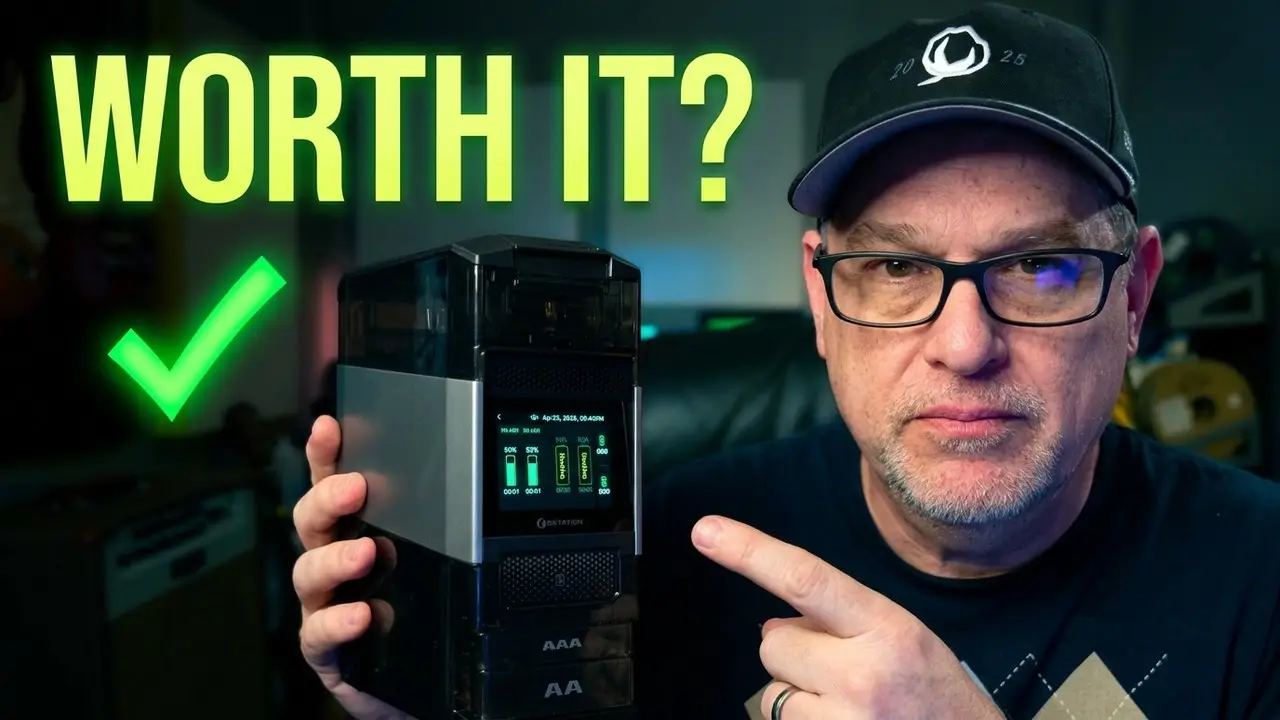
The Ostation 2 Pro is a 3-in-1 smart battery charging station from Olight. It handles AA and AAA rechargeable batteries, charges Olight flashlights via built-in side ports, and — this is the part that really sets it apart — it tests and rejects bad batteries automatically.
For photographers, content creators, or anyone who runs through rechargeables constantly, that last feature alone changes the game.
Pick up the Olight Ostation 2 Pro on Amazon: https://amzn.to/4uw4eBl
What’s in the Box
| What’s Included | Details |
|---|---|
| Ostation 2 Pro Unit | The main charging station |
| Charging Cable | For powering the unit |
| Instructions | Setup and app guide |
The unit itself is translucent, which is a nice touch — you can actually see the batteries loaded inside the carousel as they charge.
Build and Design: Drop-In Simplicity
The Ostation 2 Pro uses a carousel-style loading system. You drop batteries in from the top and they line up inside. The unit has clearly labeled sections — one for AA, one for AAA, and a separate rejection port in the middle for batteries that don’t pass the test.
One of the first things I noticed: you don’t have to worry about polarity. Drop the batteries in any direction — the unit figures out which way they’re oriented and charges them correctly. That’s a small thing that makes a real difference when you’re quickly dumping a handful of batteries in after a shoot.
The carousel takes a couple of minutes to check and load each battery, but once it’s running, it’s hands-off. The unit is translucent so you can watch the process, and the display screen gives you full charging status at a glance.
The 3-in-1 Feature Set
Here’s what the Ostation 2 Pro actually does:
1. Charges AA and AAA rechargeables
Drop them in, walk away. It handles the rest — no fussing with orientation, no separate charger slots to manage.
2. Tests batteries and rejects bad ones
This is the standout feature. The unit checks every battery you put in. If a battery is starting to fail — even if it still seems to work — the Ostation 2 Pro flags it and routes it to the rejection port. It also kicks out non-rechargeable alkalines and nickel-metal hydride batteries automatically.
I’ve had batteries for years that I assumed were still good. This thing told me otherwise. That kind of automatic health checking is something no basic charger does.
3. Charges Olight flashlights
There are two charging ports that pull down from the side of the unit. If you own Olight flashlights — which I do — you can charge them right there alongside your batteries without needing a separate cable or dock. Very convenient.
The Olight App: Wi-Fi Connected Charging
The Ostation 2 Pro connects to your home Wi-Fi network via the Olight app. Setup is simple — you add the device in the app, enter your network info, and you’re connected.
Once you’re in, the app gives you:
- Charging status for all loaded batteries in real time
- Charging schedules — set it to charge overnight, during off-peak hours, or on any schedule you want
- Sensitivity settings — the unit has a sensor that listens for the click of batteries being dropped in and automatically starts the carousel. You can adjust how sensitive that detection is.
- Firmware updates — the app checks automatically and prompts you to update. I had an update waiting on first launch, hit the upgrade button, and it handled itself in a couple of minutes.
Real-World Performance: Two Weeks of Testing
I shoot with flash a lot, and flash work burns through AAs faster than almost anything else. My old charging setup was a mishmash of different chargers — one for AAs, one for AAAs, a separate dock for flashlights. It worked, but it was a mess.
With the Ostation 2 Pro, I just leave it plugged in on my desk. When I’m done shooting, I drop the batteries in. By the time I need them again, they’re charged and ready.
A few things stood out during testing:
- The rejection feature works. I had batteries I’d been using for years that got flagged. Some were starting to lose capacity — I just never knew until this unit told me.
- The Olight Eolast lithium AA batteries (3150mWh, 1.5V) are genuinely excellent. Long-lasting, fast to recharge my flash, and I’ve been using them as my go-to for flash work since the test started.
- The flashlight charging ports are more useful than expected. Having batteries and flashlights charging in one place is more convenient than it sounds.
- The sensitivity sensor is a nice touch — drop batteries in and the carousel starts automatically. You can adjust the detection sensitivity in the app.
Who Should Buy the Olight Ostation 2 Pro?
Buy it if you are:
- A photographer or content creator who burns through AA/AAA rechargeables regularly
- An Olight flashlight owner who wants a single charging home base
- Someone who wants smart battery management — testing, rejection, scheduling — not just a basic charger
- Anyone who wants to leave a charger permanently on their desk and never think about it again
You might not need it if:
- You rarely use rechargeables and a basic 4-slot charger handles everything
- You don’t own Olight flashlights and don’t need the integrated charging ports
Final Verdict — Dad-Approved?
Yes. Highly recommended.
After two weeks, the Ostation 2 Pro hasn’t left my desk. It charges your batteries, keeps them healthy, rejects the ones that are past their prime, and charges your Olight lights on the side. The app integration and Wi-Fi connectivity feel genuinely useful rather than just a gimmick.
If you shoot, record, or just live in a house full of battery-powered gear, this is the charging setup you’ve been missing.
Rating: 5 / 5
Pick up the Olight Ostation 2 Pro on Amazon: https://amzn.to/4uw4eBl
As an Amazon Associate I earn from qualifying purchases. This helps support the channel at no extra cost to you.
Have you tried the Olight Ostation 2 Pro? Drop your thoughts in the comments below. And subscribe to Tech4Dads for dad-approved gear reviews every week.
About the Author